


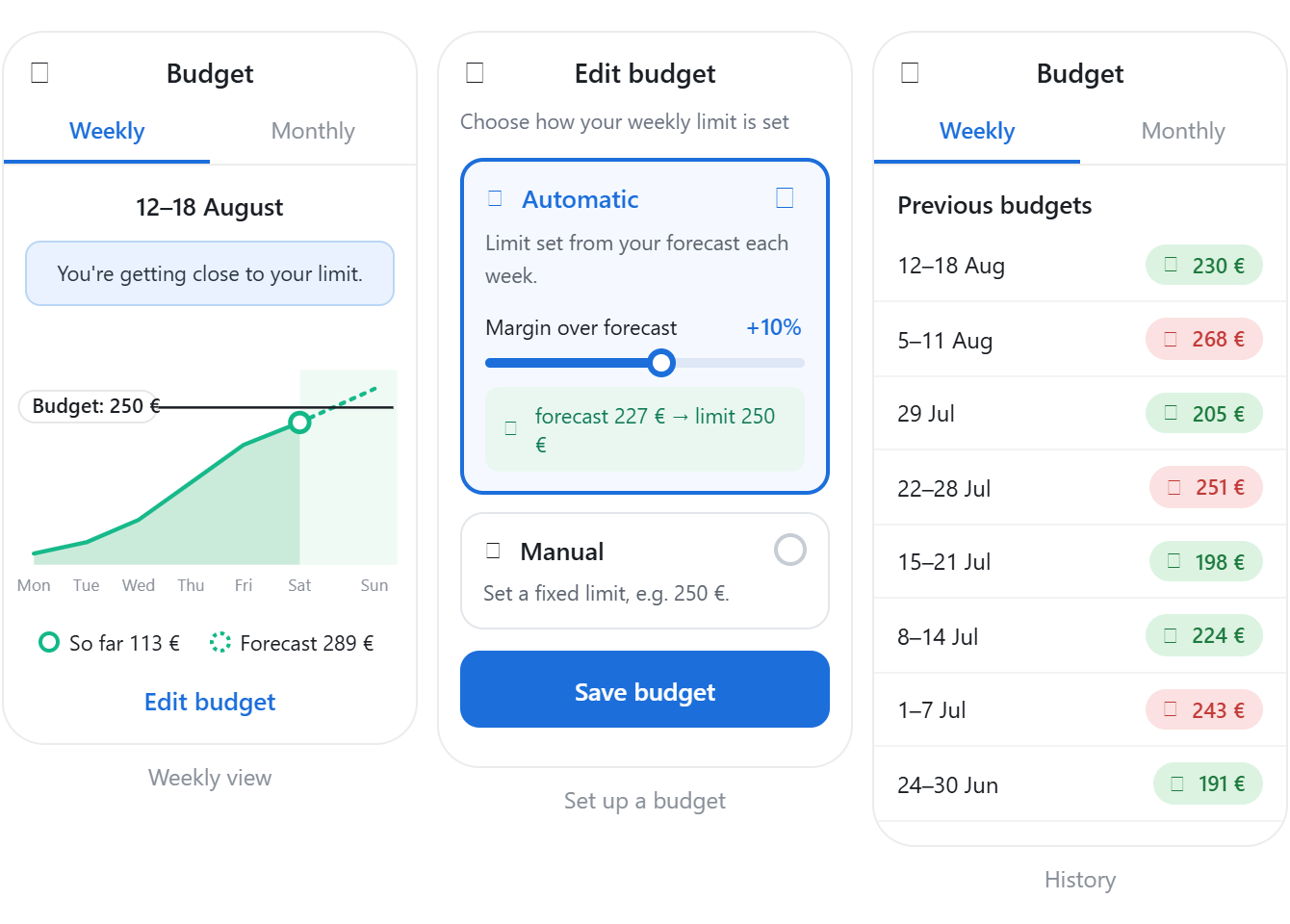
Budgets that set themselves, and show how you’re tracking
Budgets can now derive limits from forecasts, return cumulative progress for the current period, and report historical performance. All changes are additive; existing integrations require no changes.
New interface design
Lorem ipsum dolor sit amet, consectetur adipiscing elit lobortis arcu enim urna adipiscing praesent velit viverra sit semper lorem eu cursus vel hendrerit elementum morbi curabitur etiam nibh justo, lorem aliquet donec sed sit mi dignissim at ante massa mattis.
- Neque sodales ut etiam sit amet nisl purus non tellus orci ac auctor
- Adipiscing elit ut aliquam purus sit amet viverra suspendisse potent
- Mauris commodo quis imperdiet massa tincidunt nunc pulvinar
- Excepteur sint occaecat cupidatat non proident sunt in culpa qui officia
New notifications panel
Nulla euismod lacus vitae vulputate elit tellus iaculis elit donec nunc consequat cursus vestibulum in in et sit auctor neque semper libero nunc bibendum porttitor fusce fringilla malesuada est in feugiat cursus gravida auctor tempor facilisi ut id vel arcu nibh sem pellentesque id ornare volutpat nisi tristique mattis.
New team members management
At risus viverra adipiscing at in tellus integer feugiat nisl pretium fusce id velit ut tortor sagittis orci a scelerisque purus semper eget at lectus urna duis convallis porta nibh venenatis cras sed felis eget neque laoreet suspendisse interdum consectetur libero id faucibus nisl donec pretium vulputate sapien nec.
- Neque sodales ut etiam sit amet nisl purus non tellus orci ac auctor
- Adipiscing elit ut aliquam purus sit amet viverra suspendisse potenti
- Mauris commodo quis imperdiet massa tincidunt nunc pulvinar
- Adipiscing elit ut aliquam purus sit amet viverra suspendisse potenti
New API access
Nisi quis eleifend quam adipiscing vitae aliquet bibendum enim facilisis gravida neque euismod in pellentesque massa placera diam donec adipiscing tristique risus amet est placerat in egestas erat.
New API requests
Eget lorem dolor sed viverra ipsum nunc aliquet bibendum felis donec et odio pellentesque diam volutpat commodo sed egestas aliquam sem fringilla ut morbi tincidunt augue interdum velit euismod eu tincidunt tortor aliquam nulla facilisi aenean sed adipiscing diam donec adipiscing ut lectus arcu bibendum at varius vel pharetra nibh venenatis cra.
Budgets that set themselves, and show how you’re tracking
Budgets can now derive limits from forecasts, return cumulative progress for the current period, and report historical performance. All changes are additive; existing integrations require no changes.
What's changing
Budgets now support three new capabilities on the existing Budgets API:
1. Automatic budgets.
Set mode: auto to derive the budget limit from the location forecast. At the start of each period, the limit is calculated as:
forecast × (1 + margin_percent / 100)
The limit is then fixed for that period. margin_percent defaults to 20 and is clamped server-side to [-50, 50].
2. In-period progress.
GET /budgets now returns series.consumption_cumulative and series.forecast_cumulative, with one value per step in the current period. Use these series to chart actual consumption against forecast without additional API calls.
3. Budget history.
A new /budgets/history endpoint returns aligned limit and consumption series for past periods, making it easy to show under- or over-budget performance over time.
GET /budgets also returns a new config object describing how the limit is set: mode (manual or auto) and margin_percent.
Backward compatibility
These changes are fully additive:
- mode defaults to manual when omitted, so existing limit-based budgets behave as before.
- config, series, and the history endpoint are additions and do not change existing fields.
What you need to do
Create an automatic budget
Omit limit and set mode to "auto":
PUT /v3/locations/{locationId}/budgets?fuel=elec&unit=energy&resolution=month
{
"enabled": true,
"limit": 200000
}
Omit margin_percent to use the default of 20.
To keep a fixed budget, continue sending limit as you do today:
PUT /v3/locations/{locationId}/budgets?fuel=elec&unit=energy&resolution=month
{
"enabled": true,
"limit": 200000
}
Read the current budget and progress
GET /v3/locations/{locationId}/budgets?fuel=elec&unit=energy&resolution=month
The response now includes config and, once the budget has run, series with cumulative consumption and forecast data for the current period.
Read historical performance
GET /v3/locations/{locationId}/budgets/history?fuel=elec&unit=energy&resolution=month
Each index in limit and consumption represents the same period between from and to. Compare the values to determine whether the location was under or over budget.
Value for end users
- Zero-setup budgets. Auto mode creates a sensible budget from the forecast without requiring users to choose a limit.
- Clear progress. Cumulative series show actual consumption against expected consumption throughout the current period.
- Performance over time. Budget history provides a track record of periods under or over budget.